

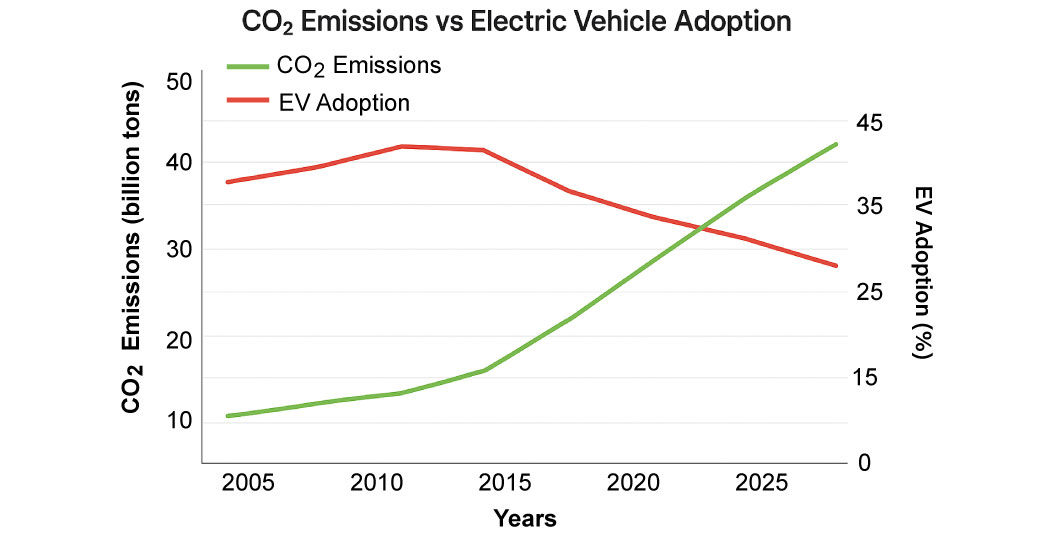
#DI-0001CO₂ Emissions and EV GrowthEasyLine
Preparation phase00:25
PreviousNext

Start PTE describe-image practice & get familiar with the task format to improve your fluency and pronunciation.
PTE Describe Image is a Speaking task where you describe an image shown on screen after a 25 second preparation time, speaking once the recording starts. It scores content, oral fluency, and pronunciation across 5–6 questions in PTE Academic and 3–4 in PTE Core, contributing to your Speaking score.
Cover the key message and the main details fluently. You don't need every number — a clear, well-structured description of the overall trend scores best.
Weighted on every response · PTE Academic
Name the key features, trends and the overall message the image shows.
Keep talking for the full 40 seconds at a smooth, even pace.
Say data, labels and terms clearly enough to be understood.
Master Describe Image with quick, effective techniques for clear and high-scoring responses.
Spend the first few seconds scanning the image for its main idea. Identify key elements such as trends, categories, or relationships so you can build a clear and structured response.
Begin your description by stating what the image represents. A simple, clear overview sets a strong foundation and helps you sound organized from the very first line.
Pick out the most important features instead of trying to cover everything. Focus on noticeable patterns, high or low values, or standout elements that add meaning to the image, and you can strengthen this skill by practicing regularly with a PTE online mock test.
Speak at a controlled, natural pace to ensure your description is easy to follow. Good rhythm, clear pronunciation, and a steady flow help improve your fluency score.
Avoid complex terms or long sentences that may break your flow. Using straightforward phrases allows you to describe the image smoothly and maintain clarity throughout, especially when practicing regularly with PTE practice questions.
End with a short concluding line that summarizes the overall message of the image. A concise ending shows structure, confidence, and a good command of the speaking format.
What the task shows you, how it is scored, and the mistakes that cost the most.
5–6 in PTE Academic and 3–4 in PTE Core. You get 25 seconds to study the image and 40 seconds to describe it.
Open with what the image shows, give two or three key features such as the highest, lowest or overall trend, then close with a one-line conclusion. Keep talking until the timer ends.
Bar charts, line graphs, pie charts, tables, maps, process diagrams and photographs. Charts are the most common, so practice reading a trend quickly.
No. Content is scored on key features and the overall message, not on listing data. Two or three accurate figures with the trend score better than reading every value.
Use one fixed template for every image so you never search for words, and practice speaking for the full 40 seconds without pausing. Fluency carries more weight than the number of details.
Pausing to read data, stopping before 40 seconds, and describing every value instead of the main trend. Restarting a sentence is the costliest, as it lowers fluency.
5–6 in PTE Academic and 3–4 in PTE Core. You get 25 seconds to study the image and 40 seconds to describe it.
Open with what the image shows, give two or three key features such as the highest, lowest or overall trend, then close with a one-line conclusion. Keep talking until the timer ends.
Bar charts, line graphs, pie charts, tables, maps, process diagrams and photographs. Charts are the most common, so practice reading a trend quickly.
No. Content is scored on key features and the overall message, not on listing data. Two or three accurate figures with the trend score better than reading every value.
Use one fixed template for every image so you never search for words, and practice speaking for the full 40 seconds without pausing. Fluency carries more weight than the number of details.
Pausing to read data, stopping before 40 seconds, and describing every value instead of the main trend. Restarting a sentence is the costliest, as it lowers fluency.

